
Table of Contents
ToggleWhat Is an Employee Clock In System?
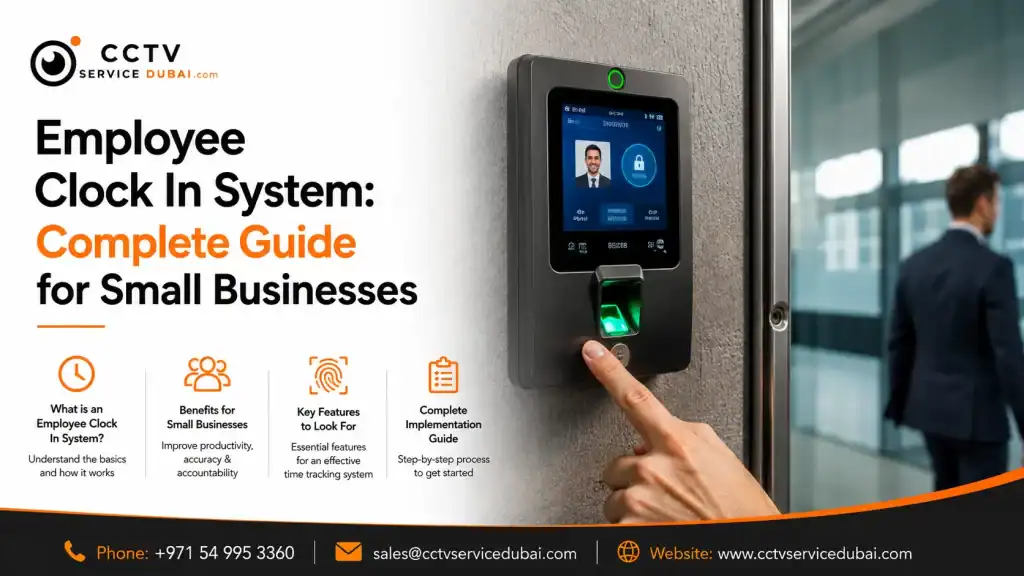
An employee clock in system is a digital solution that records when employees start and finish work. Instead of using paper registers or spreadsheets, businesses can use fingerprint scanners, facial recognition, RFID cards, PINs, mobile applications, or cloud platforms to automate attendance tracking.
A modern system can help businesses manage:
- Employee check-in and check-out
- Working hours
- Overtime
- Late arrivals
- Absences
- Shifts
- Leave
- Attendance reports
For small businesses, this can reduce repetitive HR work while providing a more accurate record of employee attendance.
Why Do Small Businesses Need a Clock In System?
Manual attendance may work when a business has only a few employees. As the workforce grows, however, calculating working hours and managing attendance records becomes increasingly time-consuming.
A clock in system for small business can automate much of this process.
Instead of collecting attendance sheets and manually calculating hours, the system records employee activity electronically.
Key benefits include:
- Reduced paperwork
- Fewer manual errors
- Faster attendance reporting
- Better employee accountability
- Easier payroll preparation
- Centralized attendance records
- Improved visibility of working hours
For businesses with shifts or multiple departments, automation becomes even more valuable.
How Does an Employee Clock In System Work?
Most systems follow a simple process:
Employee Identification → Verification → Attendance Record → Software
For example:
- An employee arrives at work.
- They use a fingerprint, face, card, PIN, or mobile credential.
- The system verifies their identity.
- The check-in time is recorded.
- The information is transferred to attendance software.
- HR can view the attendance record.
When the employee leaves, the same process records the check-out time.
The software can then calculate working hours based on the configured schedules and attendance rules.
What Types of Employee Clock In Systems Are Available?
Businesses have several options depending on their requirements.
| System | Best For | Main Advantage |
|---|---|---|
| Fingerprint | Offices and retail | Reliable identification |
| Facial recognition | Modern workplaces | Contactless verification |
| RFID/card | General businesses | Simple to use |
| PIN | Small teams | Easy implementation |
| Mobile | Remote employees | Flexible attendance |
| Cloud-based | Multiple locations | Centralized management |
The best solution depends on the number of employees, work environment, budget, shift structure, and software requirements.
What Are Biometric Time Clock Systems?
Biometric time clock systems identify employees using physical characteristics such as fingerprints or facial features.
Unlike a traditional attendance sheet or shared access card, biometric authentication connects an attendance event to a registered employee.
Common biometric options include:
- Fingerprint recognition
- Facial recognition
- Palm recognition
- Other biometric technologies
For many small and medium-sized businesses, fingerprint and facial recognition provide a practical balance between convenience and employee identification.
How Does a Fingerprint Time Clock System Work?
A fingerprint time clock system records attendance by matching an employee’s fingerprint with their registered biometric data.
The process generally involves:
Employee Enrollment
The employee’s fingerprint is registered in the attendance device.
Authentication
The employee places their finger on the scanner.
Verification
The device compares the scan with the registered biometric template.
Attendance Recording
Once verified, the check-in or check-out event is recorded.
Software Synchronization
The attendance information is transferred to the management platform.
Why Choose Fingerprint Attendance?
A fingerprint system can offer:
- Quick authentication
- No physical attendance cards
- Automated attendance records
- Simple employee enrollment
- Potential integration with access control
However, fingerprint recognition may not be ideal for every workplace. Employees working with dust, chemicals, oils, or materials that affect fingerprints may experience difficulties. In such environments, another authentication method may be more suitable.
What Is a Facial Recognition Time Clock?
A facial recognition time clock identifies employees using facial characteristics instead of requiring physical contact with a scanner.
This makes it an attractive option for businesses looking for contactless attendance.
Potential benefits include:
- Contactless check-in
- Fast employee verification
- No physical cards
- Convenient attendance tracking
- Reduced shared-credential issues
Businesses should nevertheless consider privacy, data protection, lighting conditions, device positioning, and the technology used by the selected system.
Are Cloud Based Time and Attendance Systems Useful?
Cloud based time and attendance systems allow businesses to manage attendance information through an online platform.
This can be particularly useful for companies with multiple offices, branches, or employees working across different locations.
Depending on the platform, HR managers may be able to:
- View attendance remotely
- Manage employees
- Create shifts
- Generate reports
- Manage multiple locations
- Monitor attendance
- Access dashboards
A cloud-based system can eliminate the need to depend entirely on one local computer for attendance management.
However, businesses should evaluate the provider’s security, user permissions, data storage, backup policies, and support before choosing a cloud solution.
What Is an Online Attendance Management System?
An online attendance management system allows authorized users to manage employee attendance through a web-based or cloud-connected platform.
Depending on the software, HR teams can manage:
- Employee profiles
- Departments
- Shifts
- Holidays
- Leave
- Overtime
- Attendance reports
- Multiple locations
For example, a company with offices in different areas can potentially manage employee attendance from a centralized platform rather than maintaining separate spreadsheets for each location.
This can reduce administrative work and improve visibility.
What Is a Staff Clock In and Out System?
A staff clock in and out system records when employees start and finish their working day.
It can help managers answer practical questions such as:
- Who has arrived?
- Who is absent?
- Who arrived late?
- Who has left?
- How many hours has an employee worked?
- Who has worked overtime?
This is particularly useful for businesses with shift-based employees.
A digital system can automatically maintain these records instead of requiring managers to check paper attendance sheets.
Can Attendance Systems Manage Different Shifts?
Yes. Many modern attendance platforms support multiple shift schedules.
For example:
- Morning: 8:00 AM – 5:00 PM
- Evening: 2:00 PM – 11:00 PM
- Night: 10:00 PM – 7:00 AM
Depending on the software, HR can assign different schedules to different employees or departments.
This can be useful for:
- Retail businesses
- Restaurants
- Hotels
- Warehouses
- Factories
- Security companies
- Healthcare organizations
The software can then generate attendance reports based on the assigned schedules.
Can an Employee Clock In System Integrate With Payroll?
Many attendance systems can export or integrate attendance information with HR or payroll software, depending on the platform.
Attendance data can include:
- Working hours
- Overtime
- Absences
- Late arrivals
- Early departures
- Leave
This information can then support the payroll process.
Before purchasing, businesses should confirm whether the attendance platform is compatible with their existing HR or payroll software.
Can Attendance Systems Be Integrated With Door Access Control?
Yes. Some systems can combine employee attendance with physical access control.
For example:
Fingerprint/Face → Employee Verification → Attendance Record + Authorized Door Access
An employee could use the same biometric credential to record attendance and enter an authorized area.
This can be useful for:
- Main entrances
- Server rooms
- HR offices
- Storage areas
- Management offices
- Restricted departments
Integration capabilities depend on the specific biometric device, controller, software, and door hardware.
How Do You Choose a Clock In System for a Small Business?
Before purchasing a clock in system for small business, consider the following:
1. Number of Employees
Choose a device and software platform that supports your current workforce and future growth.
2. Authentication
Decide whether you need fingerprint, facial recognition, RFID, PIN, mobile, or a combination.
3. Working Hours
Check whether the system supports your shifts, breaks, overtime, and attendance rules.
4. Locations
Businesses with multiple branches may benefit from centralized or cloud-based management.
5. Reporting
Make sure HR can generate the reports required for attendance and payroll.
6. Integration
Check compatibility with payroll, HR, access control, and other business platforms.
7. Support
Review warranty, technical support, software updates, and maintenance options.
How Much Does an Employee Clock In System Cost?
There is no universal price because the total cost depends on the system configuration.
Factors can include:
- Number of employees
- Number of devices
- Biometric technology
- Software licensing
- Cloud subscription
- Installation
- Network requirements
- Payroll integration
- Access-control integration
- Maintenance
When requesting a quotation, check whether it includes:
| Component | What to Check |
|---|---|
| Attendance device | Brand and model |
| User capacity | Maximum employees |
| Software | Features and license |
| Installation | Included? |
| Configuration | Included? |
| Employee enrollment | Included? |
| Training | Included? |
| Cloud service | Subscription cost |
| Integration | Additional charges? |
| Warranty | Duration |
| Maintenance | Support options |
Don’t compare attendance machines based only on their purchase price. Compare the complete cost of ownership.
How Is an Attendance System Installed?
Professional installation usually follows these steps:
Step 1: Requirement Assessment
The provider reviews employee numbers, locations, shifts, and attendance requirements.
Step 2: Device Selection
The appropriate biometric or non-biometric device is selected.
Step 3: Installation
The device is installed at a convenient and accessible location.
Step 4: Network Configuration
The attendance device is connected to the required network.
Step 5: Software Setup
Employees, departments, shifts, holidays, and attendance rules are configured.
Step 6: Employee Enrollment
Fingerprints, facial profiles, cards, or other credentials are registered.
Step 7: Testing
The installer tests check-in, check-out, synchronization, and reporting.
Step 8: Training
HR administrators receive training on employee management and attendance reports.
What Mistakes Should Businesses Avoid?
Choosing an attendance system only because it is cheap can create problems later.
Common mistakes include:
- Ignoring the software
- Choosing insufficient user capacity
- Not planning for future growth
- Selecting the wrong biometric technology
- Poor device placement
- Ignoring data security
- Not testing payroll reports
- Failing to check technical support
The device is only one part of the solution. Hardware + software + installation + support should be evaluated together.
How Can CCTV Service Dubai Help?
CCTV Service Dubai provides biometric attendance and access-control solutions for businesses looking to automate employee attendance and workplace access.
Services can include:
Biometric Attendance Installation
Installation of fingerprint and facial-recognition attendance terminals.
Attendance Software Setup
Employee enrollment, department configuration, shift management, and reporting.
Access Control Integration
Integration of biometric attendance systems with electronic door-access systems where supported.
Online Attendance Solutions
Configuration of systems that allow authorized HR teams to manage attendance remotely.
Network & Structured Cabling
Network infrastructure for biometric devices, CCTV, access control, and other business technologies.
Maintenance & Support
Troubleshooting, device inspection, configuration, and ongoing technical assistance.
If you’re looking for an employee clock in system, a biometric time clock system, or an online attendance management system, CCTV Service Dubai can assess your requirements and recommend a suitable solution.
Contact CCTV Service Dubai
Frequently Asked Questions
The best system depends on employee numbers, working environment, shifts, budget, and reporting requirements. Fingerprint and facial recognition are common choices for automated attendance.
Yes. Biometric time clock systems can provide reliable employee identification when properly installed, configured, and maintained. The environment and device quality also affect performance.
Neither is universally better. Fingerprint systems can be practical and cost-effective, while facial recognition provides contactless authentication. The workplace environment should guide the choice.
Yes. Many cloud-based platforms allow authorized HR teams to manage employees and attendance across multiple locations from a centralized system.
Many systems can export or integrate attendance information with payroll platforms. Compatibility should be confirmed before purchasing.
Final Takeaway
A modern employee clock in system can make attendance management faster, more accurate, and easier to administer.
Whether you’re running a small office or a growing business with multiple locations, the right solution can automate:
Clock In + Clock Out + Working Hours + Shifts + Overtime + Attendance Reports
For businesses that need stronger employee identification, biometric time clock systems, fingerprint devices, and facial recognition provide practical options.
Meanwhile, cloud based time and attendance systems can make it easier for HR teams to manage attendance remotely.
The most important thing is to choose a system based on your employees, working environment, software requirements, security needs, and future growth—not simply the cheapest attendance machine available.

Afsal, SEO Content Writer at CCTV Service Dubai
Afsal writes the guides, cost breakdowns, and compliance explainers published on CCTV Service Dubai. His work covers CCTV camera installation, security system planning, and regulatory requirements across Abu Dhabi, Dubai, and the wider UAE, researched and written in close collaboration with the company’s installation and compliance team to keep every article accurate and current.
With a background in SEO and digital content across multiple UAE-based businesses, Afsal focuses on turning technical, regulation-heavy topics — ADMCC and SIRA requirements, camera specifications, storage and retention rules, installation costs — into guides that are actually useful for someone trying to make a decision, not just technically correct.
What Afsal Covers
CCTV camera installation guides for Abu Dhabi, Dubai, and Sharjah
ADMCC and SIRA compliance explainers
CCTV system costs, camera types, and equipment comparisons
Security camera maintenance and best practices
Buying guides for businesses choosing an installation company
How This Content Is Put Together
Every guide is developed alongside CCTV Service Dubai’s installation team, who bring the hands-on project experience — 5+ years in the field and 500+ completed installations across the UAE. Afsal’s role is to research, verify, and write that experience into guides that are clear, accurate, and genuinely helpful, rather than generic content pulled from unrelated sources.